.webp)
DLVRD vs WeTransfer
DLVRD is better suited to lasting, branded client video galleries, while WeTransfer is better suited to fast, large one-off file transfers and collecting files.
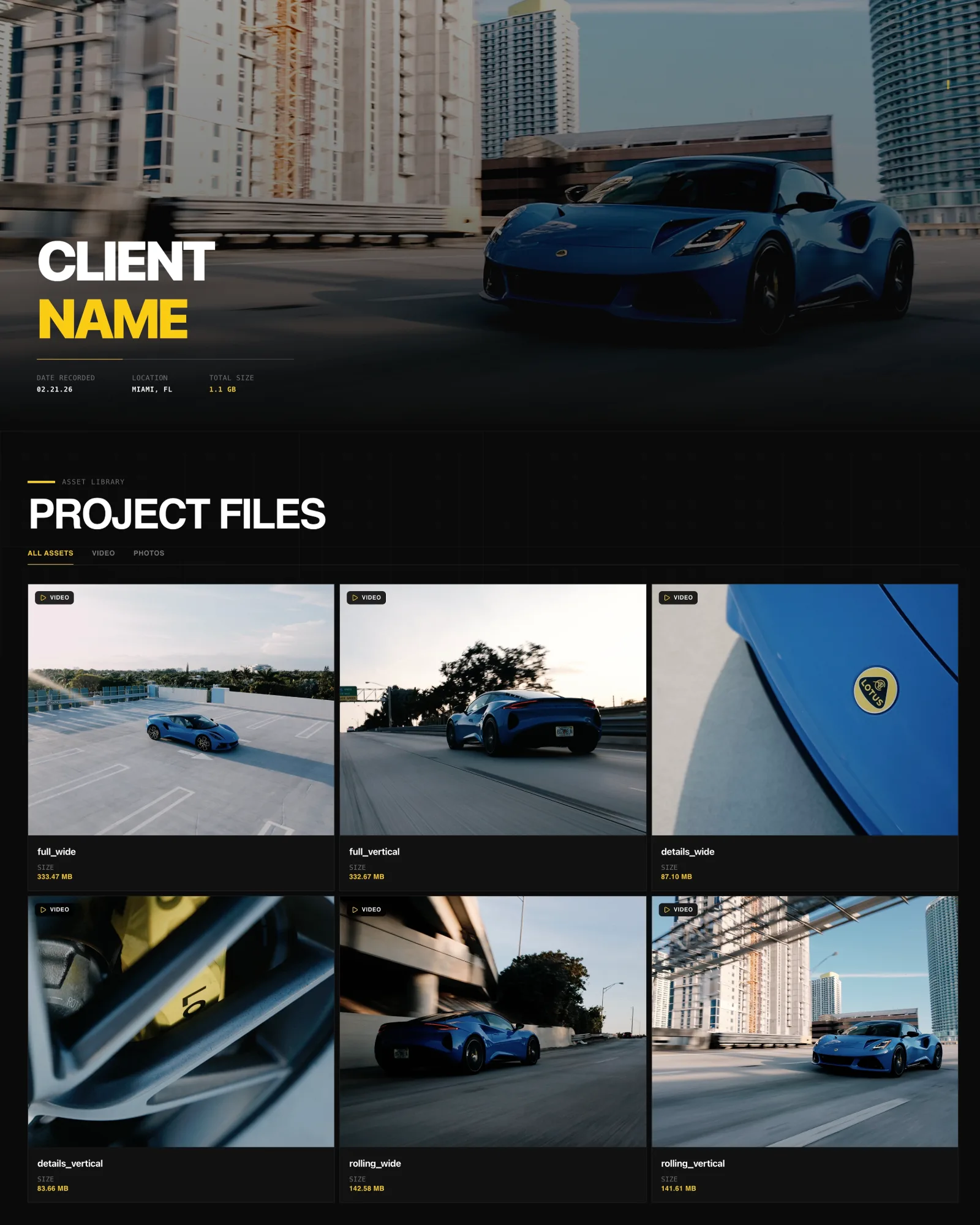
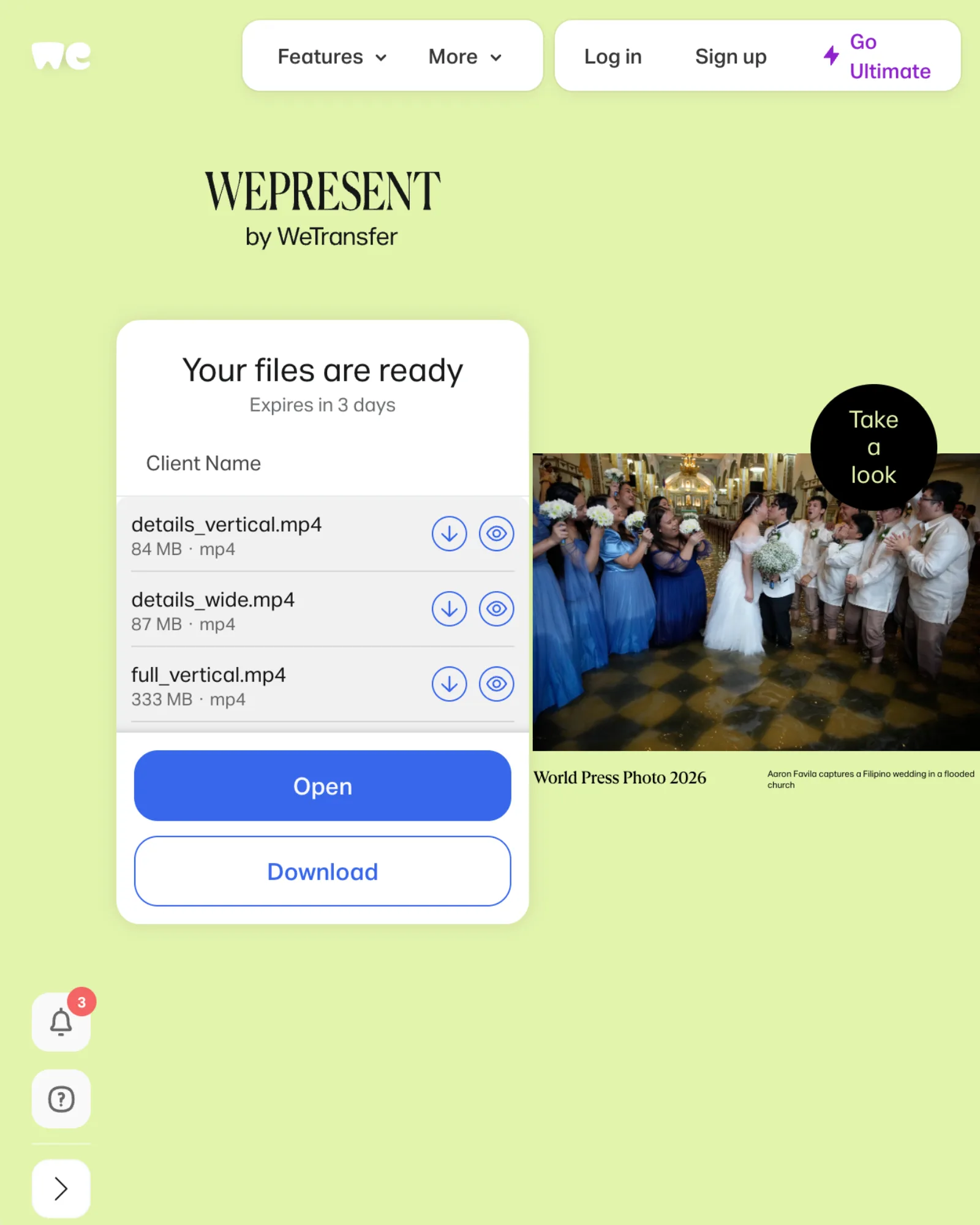
Same project, same six files, opened from a client share link. Drag to compare DLVRD (left) with WeTransfer (right). Screenshots taken October 2026.
The short answer
DLVRD is better suited to delivering finished client work as a lasting, branded gallery where clients stream, comment and download in one place. WeTransfer is better suited to fast, flexible file transfers, including very large one-off sends, raw footage handoffs and collecting files from clients. Many filmmakers will find the choice comes down to whether the delivery is a handoff or part of the product.
Choose WeTransfer if…
• You mainly need to move large files from A to B quickly, such as raw footage, project files or camera card dumps.
• You want a free option for occasional small sends (up to 10 transfers or 3 GB in a rolling 30-day window).
• You need single transfers up to 1 TB, which WeTransfer Ultimate supports.
• You want a branded upload page on your own WeTransfer subdomain so clients can send files to you.
• Your recipients are already used to WeTransfer links and you want zero setup on their side.
Choose DLVRD if…
• You deliver finished films and want the client to land in a gallery that looks like your studio, with your logo and colors.
• You want video and photos together in one link that clients can come back to, with expiry optional.
• You want timecoded comments directly under the video, without clients creating an account.
• You want to share drafts with downloads disabled or a watermark applied, then release original-quality files for the final.
• You prefer pricing based on storage for your active client galleries, starting with a free plan.
Side-by-side
| DLVRD | WeTransfer | |
|---|---|---|
| Primary purpose | Branded client galleries for video delivery | File transfer and sharing |
| Client experience | Gallery page with streaming player, photos and downloads | Transfer page with in-browser preview and download |
| Branding | Your logo and colors; DLVRD branding removed on Pro and Studio | Branded page, subdomain, wallpapers and emails on Ultimate |
| Playback | Optimized streaming copies (H.264), works on phones | In-browser video preview |
| Downloads | Untouched originals; downloads can be disabled | Original files; recipients can pick which files to download |
| Feedback/comments | Timecoded comments under the media, no client account | Comments on individual files (off by default), name and email, no account |
| Security | Password protection, watermark, optional expiry | Password protection and Access Control on Ultimate |
| Link lifetime | Galleries stay live until you set an expiry or remove them | Up to 3 days on Free and Starter; custom, including never, on Ultimate |
| Large files | Priced by active storage (10 GB free up to 3 TB) | Up to 3 GB per transfer free; up to 1 TB per transfer on Ultimate |
| Pricing (as of Oct 2026) | Free; $15, $39, $79 per month | Free, Starter, Ultimate, Teams, Enterprise |
Where WeTransfer is stronger
• Raw transfer capacity. Ultimate allows unlimited transfers of up to 1 TB each, which suits huge one-off sends.
• Familiarity. WeTransfer is widely recognized, so most recipients know what to do with a link.
• Collecting files. The branded WeTransfer page doubles as a portal where clients upload files to you.
• Custom subdomain. Ultimate includes your own WeTransfer subdomain; DLVRD does not offer custom domains.
• Download verification. Tracked downloads in Access Control can require recipients to verify their email, with a notification for each download.
• Teams. WeTransfer offers team plans with pooled storage, shared branding and admin controls.
Where DLVRD is stronger
• Presentation as the product. Deliveries open as a gallery built around your brand, rather than a transfer page.
• Video and photos together. One link holds the film, cut-downs and stills.
• Feedback on the timeline. Comments are timecoded and sit under the media.
• Draft controls. Watermarks and disabled downloads let you share cuts before final approval.
• Lasting deliveries by default. Galleries stay available for clients to revisit, on every plan.
Pricing at a glance (as of October 2026)
DLVRD: Starter is free (10 GB, two galleries, no credit card). Basic is $15/month for 500 GB, Pro $39/month for 1 TB (DLVRD branding removed), and Studio $79/month for 3 TB with three additional team seats. Yearly billing saves 15%.
WeTransfer: Free (10 transfers or 3 GB per rolling 30 days), Starter (10 transfers or 300 GB per 30 days), Ultimate (unlimited transfers up to 1 TB each, 2 TB storage, custom expiry, branding), plus Teams and Enterprise. Check WeTransfer's pricing page for current rates.
Can you use both?
Yes, and it is a common fit. Use WeTransfer to receive raw footage, logos and project files, or to hand a multi-terabyte archive to a post house. Use DLVRD for the client-facing part: review cuts with comments, then the final branded gallery the client keeps.
FAQs
Does WeTransfer let clients preview video before downloading?
Yes. Transfers include a preview page where recipients can watch videos in the browser.
Do clients need an account on either service?
No. DLVRD clients open the gallery with the link (and password, if set). WeTransfer recipients don't need an account, though they enter a name and email to comment.
Which is better for raw footage handoffs?
WeTransfer is often the simpler choice for one-off raw footage transfers. DLVRD is built for the finished delivery.
If your deliveries are part of what clients pay for, DLVRD's free plan is an easy way to test a branded gallery on a real project.
Last reviewed October 2026. Spot something out of date? Let us know.