.webp)
DLVRD vs Dropbox
DLVRD is better suited to branded client video delivery, while Dropbox is better suited to general storage, sync, team file sharing and in-edit review via Replay.
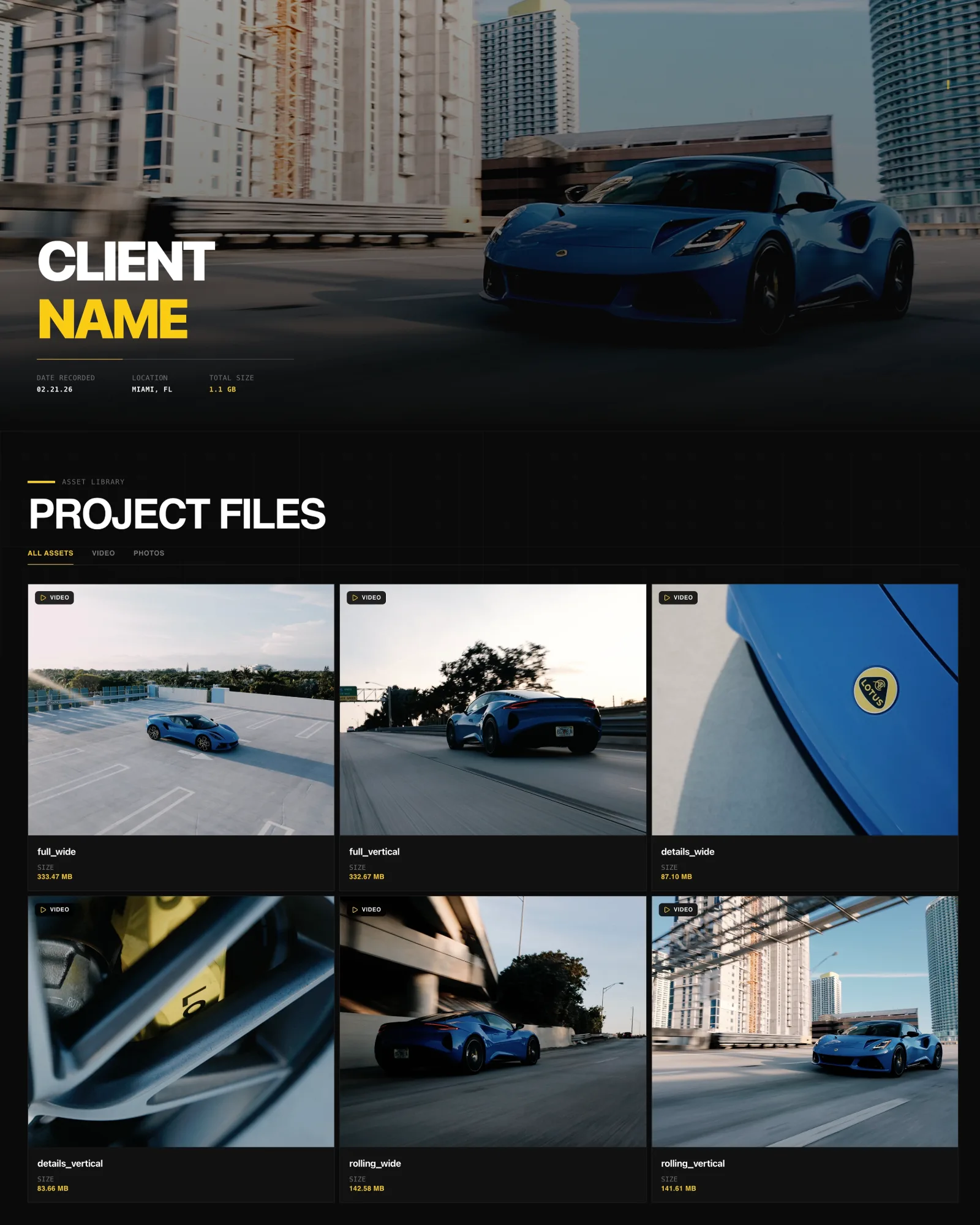
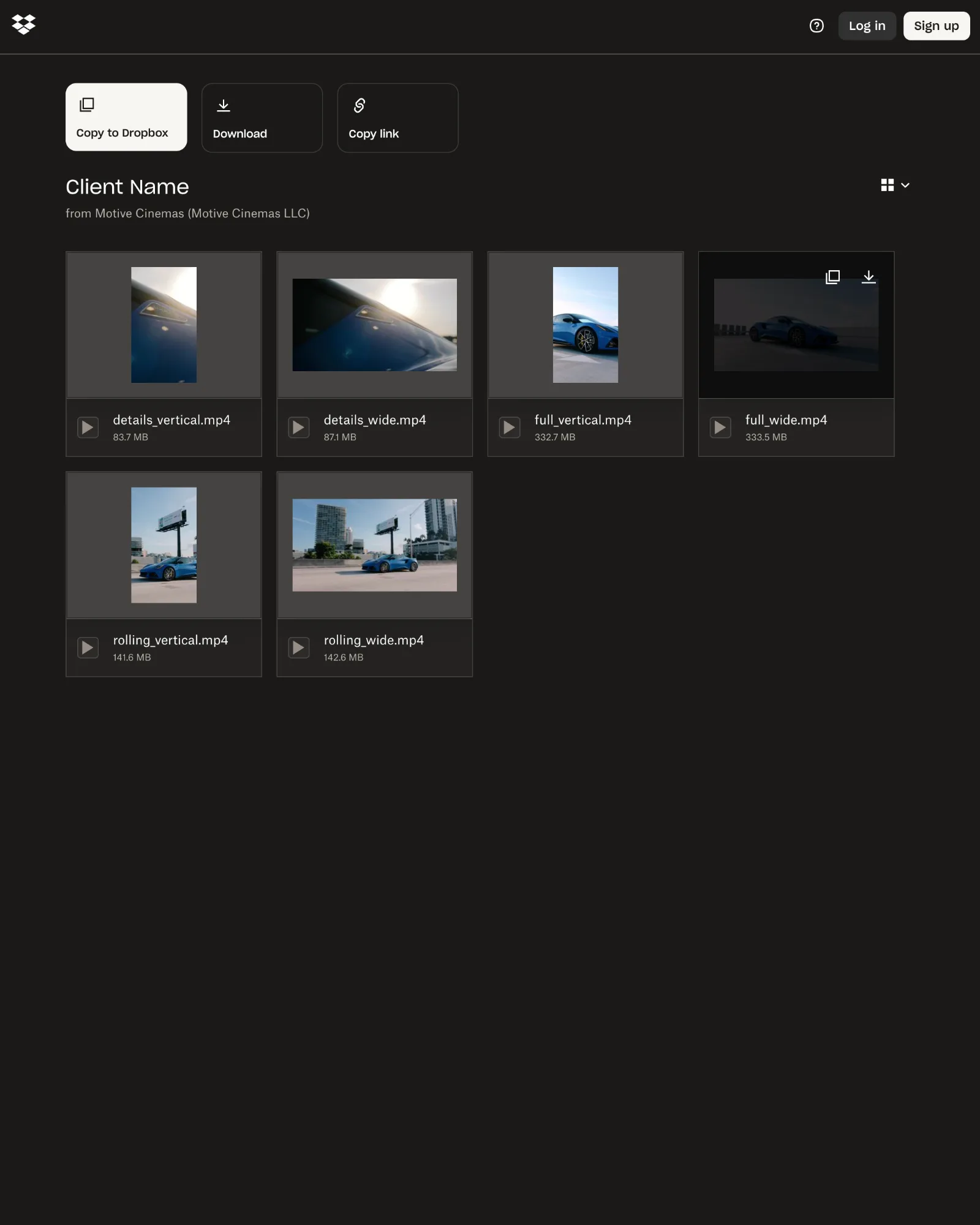
Same project, same six files, opened from a client share link. Drag to compare DLVRD (left) with Dropbox (right). Screenshots taken October 2026.
The short answer
DLVRD is better suited to handing finished films to clients in a branded gallery, while Dropbox is better suited to storing, syncing and sharing all of your files, including video, across devices and teams. Dropbox covers more ground; DLVRD focuses on the final client handover.
Choose Dropbox if…
• You need general cloud storage and desktop sync for project files, documents and footage
• Your team already works in Dropbox and shares folders day to day
• You want frame-accurate review during the edit through Dropbox Replay, with annotations and version comparison
• You send large one-off files with Dropbox Transfer (up to 250 GB per transfer on Business Plus and Enterprise)
• You want one subscription that covers storage, backup and file sharing
Choose DLVRD if…
• You want the client to open a gallery with your logo and colours rather than a folder listing
• You deliver video and photos together and want them in one link
• You want clients to stream in the browser, leave timecoded comments and download original files, all without an account
• You want delivery controls like passwords, watermarks, disabled downloads, optional expiry and download notifications in one place
• You want pricing based on the storage you keep live for clients
Side-by-side
| DLVRD | Dropbox | |
|---|---|---|
| Primary purpose | Client video delivery and branded galleries | Cloud storage, sync and file sharing |
| Client experience | Branded gallery page, no client account needed | Dropbox shared link or Transfer page; recipients don't need an account |
| Branding | Your logo and colours; DLVRD mark removed on Pro and Studio | Logo or background on Transfers (eligible plans) |
| Playback | Streaming renditions (H.264), adaptive to device | In-browser preview; Replay for review |
| Downloads | Untouched originals; can be disabled | Original files; disabling downloads on eligible plans |
| Feedback/comments | Timecoded comments under the media, no login | Replay: frame-by-frame comments and markups, no account needed |
| Security | Passwords, watermark, optional expiry (paid plans for passwords/watermarks) | Passwords and expiry on links and Transfers on eligible plans |
| Large files | Uploads of large masters delivered as originals | Transfer up to 100 GB or 250 GB depending on plan |
| Notifications | Email when a client downloads | Transfer view and download tracking |
| Pricing (as of Oct 2026) | Free Starter; $15, $39, $79/mo | Free Basic (2 GB); Plus from $9.99/mo billed yearly |
Where Dropbox is stronger
• Breadth. Dropbox is a full storage and sync platform with desktop apps, backup and deleted-file recovery, so it can hold your entire working library, not just deliverables.
• Review tooling. Dropbox Replay offers frame-accurate comments, on-screen markups, version comparison and editing-software integrations, which goes further than DLVRD's light comment layer. DLVRD has no formal approve button.
• Team collaboration. Shared folders and team plans suit agencies moving files between editors, producers and freelancers.
• Storage per dollar. Plus includes 2 TB for one person, and team plans start at larger pooled storage.
• Ecosystem. Many clients and collaborators already use Dropbox.
Where DLVRD is stronger
• Presentation. Deliveries open as a branded gallery with your studio's look, and DLVRD branding can be removed on Pro and Studio.
• Mixed media. Video and photos sit together in one link.
• Client simplicity. Clients watch, comment with timecodes and download originals in the browser, on desktop or phone, with no login.
• Delivery controls in one place. Passwords, watermarking (which disables downloads), disabled downloads, optional expiry and download notifications are part of every gallery on paid plans.
• Untouched originals. DLVRD streams optimized copies but the download is the exact file you uploaded.
DLVRD does not offer custom domains, file replace-in-place or a client portal login.
Pricing at a glance (as of October 2026)
DLVRD: Starter is free (10 GB, two galleries). Basic is $15/mo for 500 GB, Pro $39/mo for 1 TB, Studio $79/mo for 3 TB with three extra team seats. Yearly billing saves 15%.
Dropbox: Basic is free with 2 GB. Plus is $9.99/mo billed yearly for 2 TB. Essentials starts at 3 TB, and Business plans start at 3 TB or 15 TB for the team. The Replay Add-On is $12/mo per user billed monthly. Check Dropbox's pricing page for current rates.
Can you use both?
Yes, and many filmmakers do. A common workflow is to keep projects and raw footage in Dropbox, use Replay for review rounds during the edit, and then upload the approved masters to a DLVRD gallery for the final client handover. Dropbox stays your working library; DLVRD becomes the presentation layer the client sees.
FAQs
Do clients need an account for either?
No. DLVRD galleries open in any browser without an account, and Dropbox shared links, Transfers and Replay reviews can be opened without a Dropbox account.
Can I password protect deliveries?
Yes on both. DLVRD includes passwords from the Basic plan. Dropbox offers passwords on shared links and Transfers on eligible plans such as Essentials and Business tiers.
Does either compress my video?
DLVRD streams optimized copies but delivers the untouched original on download. Dropbox stores and shares the original file you uploaded.
If your work ends with a client opening a link, DLVRD is designed around that moment; for everything before it, Dropbox is a solid home.
Last reviewed October 2026. Spot something out of date? Let us know.